


For complete beginners, Lovable is the best no-code AI app builder I tested in 2026. Nothing else got me from the initial idea to a working app with less friction, and it was the only one that produced something I could genuinely use every day. If you're more technical and want room to grow, the surprise winner is Replit, not Base44, which is where I expected that crown to land. More on that below, because my prediction didn't survive the test.
I'm a software developer with 10 years of experience, and I run The Biz Spark, a web design and development studio. For this comparison I didn't rely on marketing pages or other people's reviews. I gave all four tools the exact same app brief and a 10-minute timer, and scored what came out. If you're a small business owner or complete beginner wondering which of these tools to trust with your idea, this is what actually happened.
How I Tested Them (the Same App, Four Times)
I wrote one product brief for an app called YesChef: an AI recipe assistant where you keep a pantry list of ingredients you have at home, and the app uses AI to generate recipes from them. The brief had five feature tiers in priority order: (1) a persistent pantry you can add/remove/edit, (2) AI recipe generation from the pantry with regeneration options, (3) saving recipes, cook history, and star ratings, (4) a follow-along cooking mode with a timer that records how long you actually took, and (5) sharing recipes via public link.
The rules: the identical brief pasted into each tool, no tech stack specified so each platform uses its own, 10 minutes of working time after the first generation finished, free tier wherever possible, and the tool's own suggestions followed when offered. I scored each on tiers completed, ease of use, design, and, most importantly as it turned out, AI integration friction.
Credit where due: the format was inspired by this video (opens in a new tab), though I added Replit to the lineup and used a real app from my own project list rather than a demo.
The first generation took roughly five minutes on every platform, with one exception I'll get to in the Base44 section.
What Is a No-Code AI App Builder?
A no-code AI app builder is a tool that turns a plain English description into a working web application. You type what you want, and it writes, hosts, and runs the code for you. Unlike traditional website builders such as Wix or Squarespace, which assemble pages from pre-made blocks, these tools generate real custom software: databases, logins, logic, and all.
Lovable Review: the One I'd Actually Keep Using
Verdict: best for beginners, and it wasn't close. Lovable completed all five tiers, the AI recipe generation worked immediately with zero setup on my end, and the whole test cost me $0.
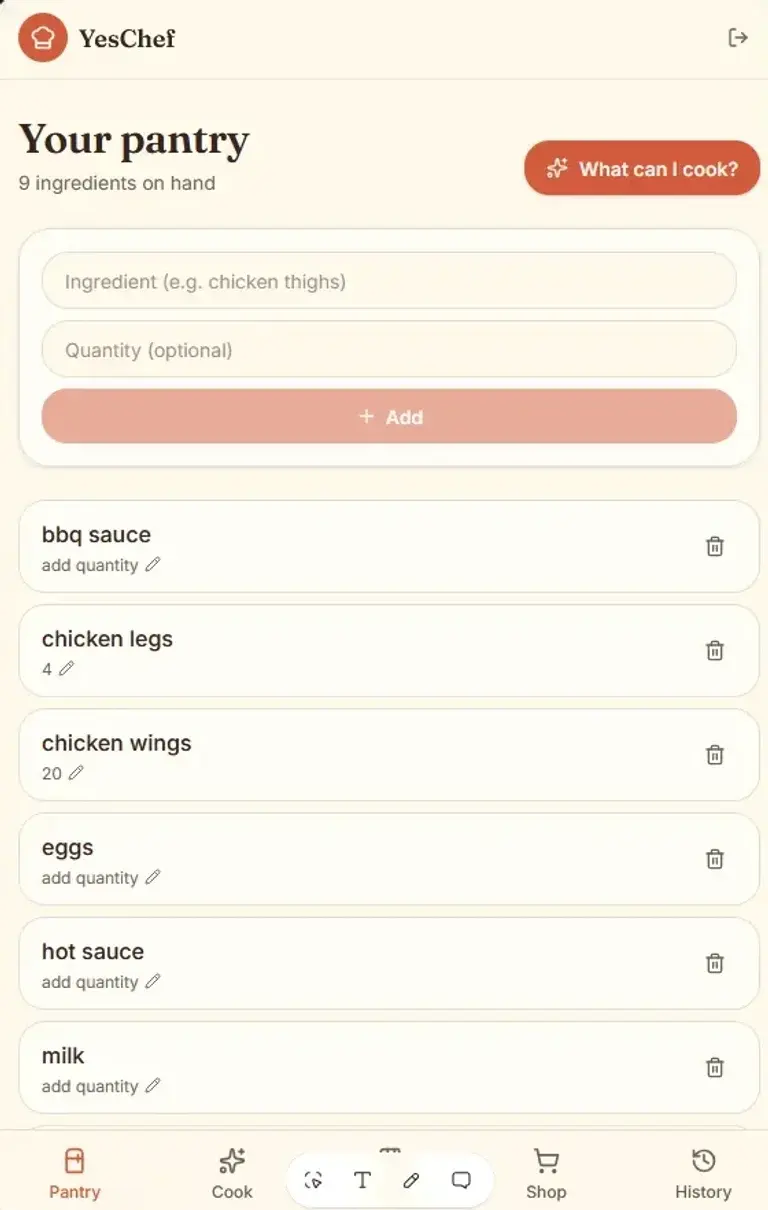 Lovable's pantry: clean, mobile-first, and ready to generate recipes with zero AI setup on my end.
What impressed me most wasn't just that everything worked. It's that Lovable made the experience feel collaborative. It proactively suggested adding a shopping list feature, which genuinely improved the app, and when I prompted it to prevent duplicate pantry items, it handled that cleanly too. It even generated a proper login screen without being asked.
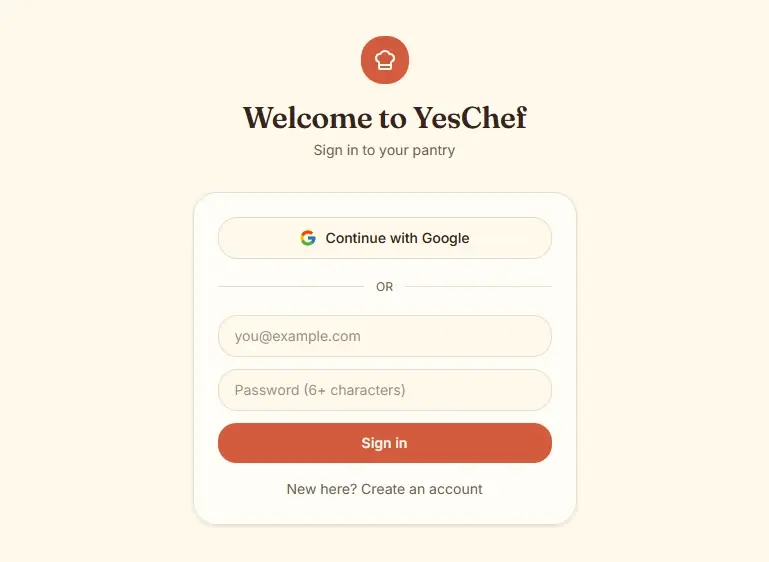 The login screen Lovable added without me asking, complete with Google sign-in.
It wasn't flawless: I hit a few visual glitches when switching between accounts, and I eventually ran out of free credits. I also wasn't a big fan of the color scheme, but it must have been my initial prompt as I quickly noticed all other apps leaned towards the orange and cream palette. Still, my honest note at the end of the timer was: "this by itself would be an app I could use every day."
Best for: complete beginners, non-technical founders, anyone who wants a working app without ever seeing the word "API."
Bolt Review: Great Output, but This Is Where "No-Code" Ends
Verdict: a strong tool with one big beginner trap. Bolt also completed all five tiers with solid design, but to get the AI recipe generation working, it asked me for an OpenAI API key and a model name.
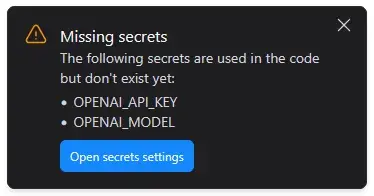 The exact moment "no-code" becomes "some-code": Bolt won't run the core feature until you supply your own OpenAI key and model.
Read that again from a non-technical person's perspective. To make the core feature of the app work, you need to know what OpenAI's developer platform is, create an account, add billing, generate a secret key, and pick a model from a list of cryptic names. I'm a developer, so this was a two-minute detour. Even then, my first key inexplicably didn't work and I had to generate a second one before Bolt accepted it. I still don't know whether that was Bolt's fault or OpenAI's. For a beginner, that's potentially the end of the road, and it's why Bolt scored 5/10 on AI integration friction against Lovable's 10.
Design-wise the output was good, though it skipped a login screen entirely and the app name didn't appear anywhere on the page navigation or headers, only in descriptive text. I also ran out of free tokens when I asked it to add the shopping list feature the Lovable version had, so a nice feature went unfinished.
In regards to the design, like I mentioned before there must have been something with my initial prompt because even then it stayed with the orange and cream color scheme. But overall the design was clean and functional. It was less loud than the other platforms, and probably easier on the eyes.
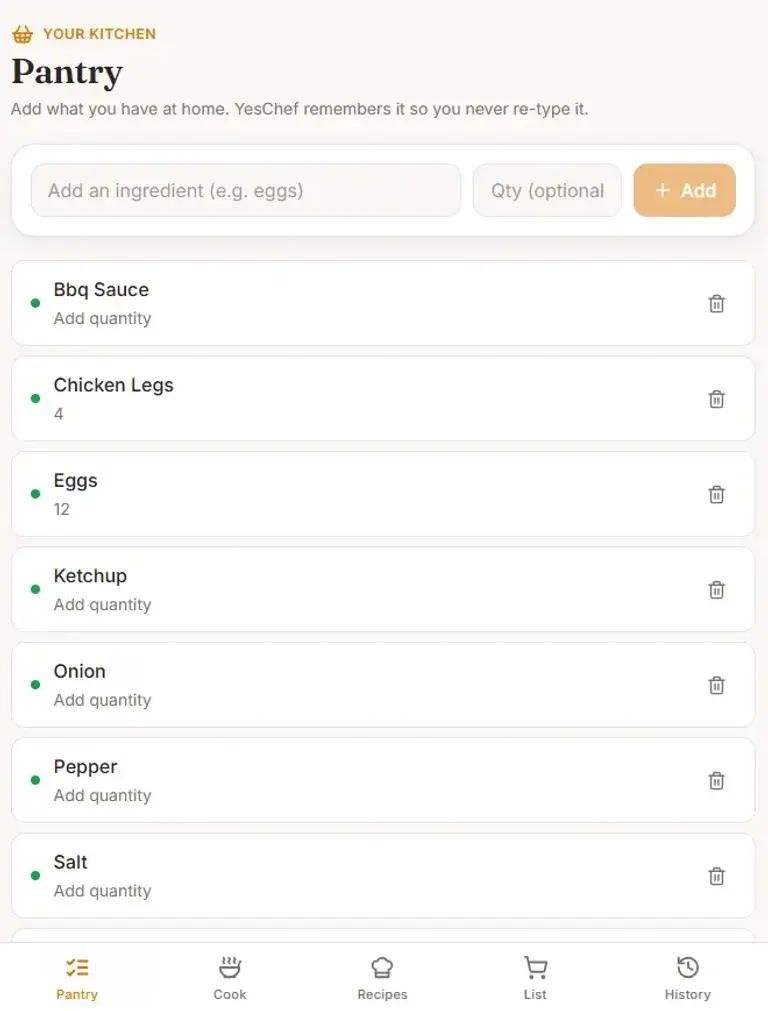 Bolt's output was clean and less loud than the others, once you got past the API key screen.
Best for: people comfortable with a little technical setup who want more control over which AI model powers their app. Bring-your-own-key is friction for beginners, but it's actually a feature if you want to manage your own costs.
Replit Review: the Surprise Winner for Technical Users
Verdict: the most generous free tier and the best debugging experience of the four. Replit completed all five tiers, and it's the platform where I got the most work done before hitting any paywall.
The AI setup sits in between the others: on the $20/month Core plan, AI integration is included, but on the free plan you supply your own API key, same concept as Bolt. Here's the difference that won me over: everything happened in the chat. When my OpenAI account turned out to be out of credits, I asked Replit if we could use OpenRouter instead, and it reconfigured on the spot, no hunting through project settings, and started using Meta's free open-source Llama 3 model. When error messages appeared on the page afterward, I pasted them into the chat and Replit fixed its own bugs. That workflow (describe the problem, get it solved, never leave the conversation) is exactly what technical tinkerers want.
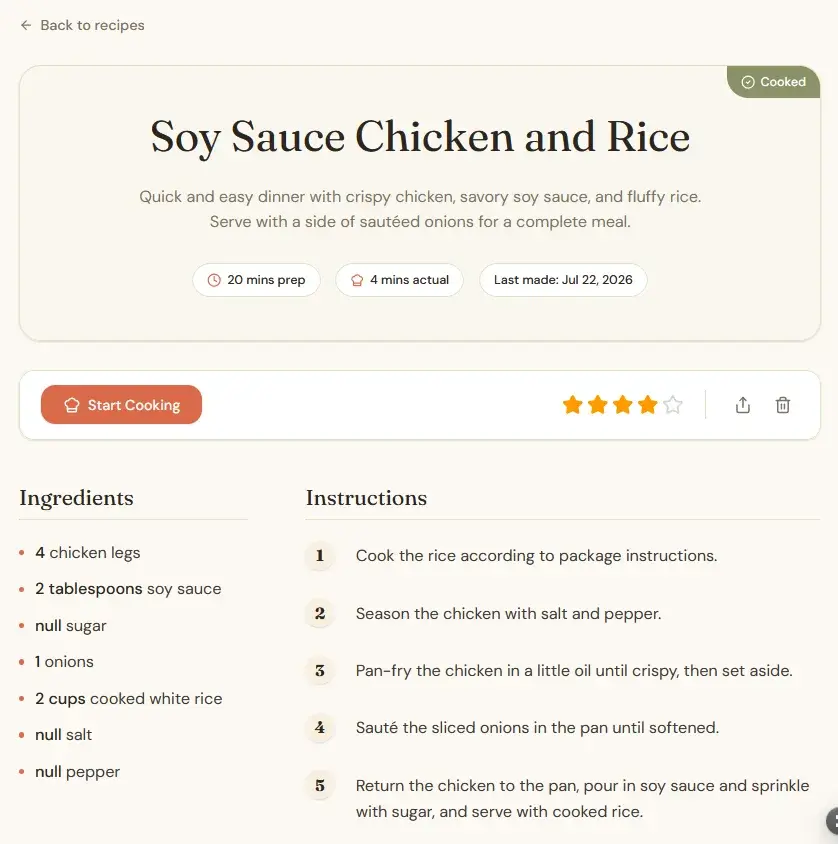 Replit nailed the deeper features (ratings, cook history, prep-vs-actual time) but built a wider, desktop-oriented layout for what should be a phone app.
The design was the weak spot. Replit built a desktop-oriented layout while Lovable and Bolt went mobile-first (and let's be honest, a pantry app lives on your phone). It wasn't responsive, some buttons were comically large until I asked for fixes, and pages were inconsistent: some dense with information, others nearly empty. All fixable with more sessions, but out of the box it trailed the others.
Best for: users with some technical knowledge who want maximum free usage, flexibility in AI providers, and a tool that can debug itself. This is where I'd send the "technical beginner," which is the spot I originally reserved for Base44.
Base44 Review: I Expected More
Verdict: easiest to start, last in my final ranking. This is the result that busted my prediction. Going in, based on Base44's heavy advertising and glowing reviews on YouTube and social media, I expected it to be the pick for more sophisticated builds. It wasn't.
The good first, because it's real: Base44's AI integration was as seamless as Lovable's. The recipe generation worked immediately, no keys, no setup. A perfect 10 on friction, and genuinely easier to use than Bolt or Replit.
But the test surfaced problems none of the other three had. The first generation got properly stuck: after about 15 minutes of spinning, I got a message that the model was taking longer than expected, and only after I stopped the chat and typed "continue" did it finish, in about 30 seconds.
 Base44 was the only platform whose first generation stalled: it took a manual "continue" to unstick it.
The app it produced was the only one with genuinely broken features: the follow-along cooking mode had no way to navigate between steps until I asked for it, notifications wouldn't clear, and the History button only responded when you clicked the icon, not the text. None of these were hard fixes. But every fix costs tokens, and Base44's free allowance ran out fastest of all four platforms. I never got to add the shopping list feature the others attempted. Design was also the most basic of the bunch: lots of white space, uninspired colors, though spacing and fonts were fine.
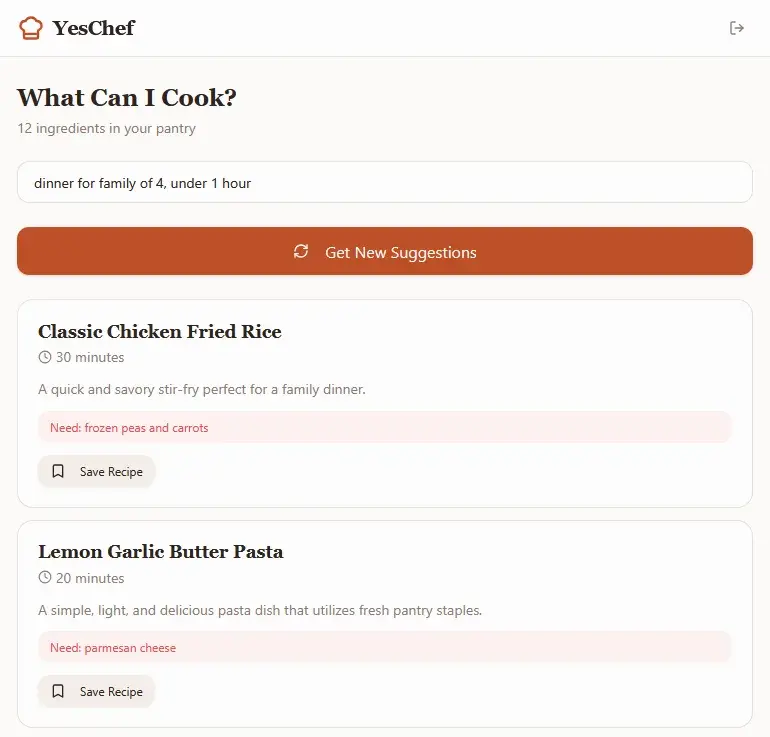 Base44's recipe suggestions worked seamlessly with no API key, but the surrounding app shipped the most bugs of the four.
Maybe the problem is that I had high hopes and was left slightly disappointed. But paying tokens to fix bugs the other platforms didn't ship is a real cost, not a vibe.
Best for: beginners who want frictionless AI features and don't mind rough edges. But if that's you, Lovable simply does the same job better right now.
The Comparison Table
| Lovable | Bolt | Replit | Base44 | |
|---|---|---|---|---|
| Tiers completed (of 5) | 5 | 5 | 5 | 4.5 |
| Ease of use /10 | 10 | 7 | 8 | 10 |
| Design /10 | 9 | 8 | 7 | 6 |
| AI integration friction /10 (higher = smoother) | 10 | 5 | 7 | 10 |
| Cost to complete the test | $0 | $0 | $0 | $0 |
| Where it hit a wall | Ran out of credits after extras | OpenAI key setup; token limit on extras | Design polish needed | Shipped bugs; fastest to burn free tokens |
| One-line verdict | The one I'd keep using | Great until the API key screen | Best free usage, best debugging | Easiest start, most disappointing finish |
The Real Finding: AI Integration Is Where Beginners Get Stuck
Every platform built the pantry. Every platform made something that looked like an app. The separation happened at one exact moment: connecting the AI. Lovable and Base44 handled it invisibly. Bolt and Replit handed me an API key form, and that form is where "no-code" quietly becomes "some-code." If you take one thing from this test as a beginner, make it this: before you commit to a platform, find out whether AI features work out of the box or require your own key. It's the single biggest difference in how these tools will treat you.
Which AI App Builder Should You Choose?
If you just want a working app with zero technical setup: Lovable. If you have some technical comfort and want the most room to experiment for free: Replit. If you want control over your AI provider and costs: Bolt. If you're choosing between Base44 and Lovable for ease: Lovable, until Base44 tightens up its output quality.
And an honest note from someone who builds websites for a living: sometimes none of these is the right call. If your app or website is your business (taking payments, handling customer data, needing to work flawlessly), a 10-minute prototype is a starting point, not a finish line. The real costs tend to surface months later, when the AI-generated code needs to change, which is exactly what I dug into in the vibe coding hangover. I'm also writing a full breakdown of when an AI builder is enough and when you actually need a developer, so keep an eye on the blog for that one.
If you'd rather learn to build with real code assistance instead, start here: how to get started with vibe coding. And once you're set up, 15 vibe coding project ideas for beginners will give you something to actually build.