

Use an AI website builder if you need a simple site that presents your business well and you have the time and the appetite to build it yourself. Hire a developer when your website needs to do something, meaning take payments, manage accounts, gate content, connect to other systems, or handle anything your business actually runs on.
And if your site is simple but you don't want to be the one building it, that's a third answer most articles on this question pretend doesn't exist. More on that below, because it's where a lot of small business owners actually live.
That's the short version, and it holds up better than most advice you'll find on this question, because most of it is written by people selling one side or the other.
I'm a developer, and I run a web design and development studio. So you'd expect me to tell you to hire a developer. Instead, I spent a week testing four AI app builders by giving each of them the same brief on a timer, and I came away genuinely impressed by what a beginner can now build alone. This post is about where that stops.
One thing worth saying up front: there are two questions here, not one. What does your site need to do, and who is going to build it? Most articles collapse those into a single question and answer it with "simple site, do it yourself." That's true for a lot of people and wrong for plenty of others, and the difference has nothing to do with how complicated the website is.

Put plainly, there are four outcomes. If your site needs to do something and you build it yourself, you are in the rebuild trap: it will serve you for about a year and then stop being enough. If your site needs to do something and you hire someone, you get a scoped custom build. If your site only needs to say something and you are happy to build it, an AI builder or a template platform will run you roughly $20 to $50 a month. And if your site only needs to say something but you don't want to be the one building it, a one-page site built for you starts at $1,499 as a fixed price. That last outcome is the one most people don't realise is available to them.
When an AI website builder is the right choice
Use one when your website's job is to inform and convince, not to operate, and you have the time to build it.
That covers more businesses than developers like to admit. If you're a photographer who needs a portfolio, a cleaning company that needs to look legitimate and take enquiries, a consultant who needs a professional presence, or a new business testing whether an idea has legs, an AI builder or a template platform will genuinely serve you. You'll get a clean site in a weekend for the cost of a subscription, and you'll be able to change your own copy without emailing anyone.
Specifically, go this route when:
- Your site is a handful of pages: home, about, services, contact.
- You need it live quickly and cheaply.
- You're comfortable doing your own tweaks and troubleshooting.
- You're validating an idea and don't yet know what the business will look like in a year.
- Nothing about your revenue depends on the site working perfectly at 2am.
- You actually have the weekend, and the one after it when something breaks.
In my testing, Lovable in particular produced something I'd have been happy to use myself, without ever asking me a technical question. If that describes your needs and you've got the time, spend the twenty dollars rather than the project budget. I mean that.
When should you hire a web developer?
Hire a developer when your website has a job beyond looking good, or when the cost of it going wrong is a real cost to your business.
The clearest signals:
- You need to take money. Subscriptions, memberships, bookings with deposits, e-commerce with real inventory.
- You need user accounts. Anything where people log in, and what they see depends on who they are.
- You need to gate content. Free for some visitors, paid for others.
- You need systems to talk to each other. Your booking tool, your CRM, your accounting software, your inventory.
- You have compliance or accessibility obligations, which is common in health, legal, and public-facing services.
- Your site is the business, not a brochure for it. If the site being down means revenue stops, you want someone accountable for it.
- You've outgrown what you built. More on this below, because it's the most common one.
There's also a quieter reason, and my testing made it concrete. Every one of the four AI builders got to a working app quickly. The differences appeared the moment I asked for something real. One platform stopped and asked me for an OpenAI API key and a model name, which is a sentence that means nothing to most business owners and is precisely where "no-code" becomes "some code." Another shipped features that looked finished but were broken, and I had to spend paid credits fixing bugs it had created. Neither of those is a disaster when you're prototyping. Both are a serious problem when it's your storefront.
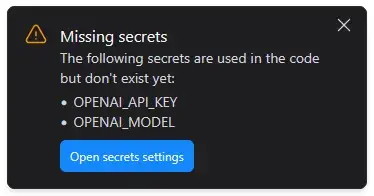 The moment "no-code" quietly becomes "some code": Bolt stopping to ask for an API key and a model name.
The most common reason people call me: the site did its job, then stopped being enough
Here's a real example, anonymized.
A client came to me with a WordPress landing page they'd set up themselves. It was fine. It had done its job for a year: it explained who they were, what they offered, and how to get in touch. Nothing was broken.
What changed was ambition. They wanted to build a community around their content, serving an audience well beyond the people they worked with directly. That meant publishing podcasts in both video and audio, sharing PDFs and written resources, and making some of it open to anyone who visited while putting the rest behind a paid subscription. Free content available to all, paid content unlocked by signing up.
None of that is something you configure. It's user accounts, payment processing, subscription state, permissions on every piece of content, and an upload system they could operate themselves without calling me every week.
The part worth noticing is what I didn't do. They'd already paid for a full year of hosting upfront, and they didn't want that money wasted. So instead of selling them a rebuild, I built what they needed on the platform they were already on, writing custom plugins so they could manage their own content categories from a familiar dashboard. Then I wrote documentation for running it themselves.
That's the honest shape of this decision. Their DIY site wasn't a mistake. It was right for year one and insufficient for year two, and the transition point wasn't about the platform. It was about the site needing to do something.
The option nobody writes about: a simple site you don't build yourself
Everything above sorts you by how complicated your website is. That's only half the question, and it's the half that leaves out the most common small business situation I actually see.
The site is simple. Four sections, a bit about the business, some photos of the work, a way to get in touch. And the owner has no interest whatsoever in building it, because they run a landscaping company or a clinic or a bakery and their evenings are already spoken for.
That person doesn't need a developer because their site is complex. They need one because building it themselves would cost them thirty hours they don't have, and because there's a difference between a website that works and a website that makes a stranger think these people are serious.
Here's the part the DIY advice skips. An AI builder will hand you a functioning site. It will not make the judgment calls: what the hierarchy should be, which typeface belongs to a business like yours, what your homepage should say in the first six words, which photo to lead with. It won't set up your Google Business Profile, put your analytics in, structure your headings so search engines can read them, or check that someone using a screen reader can actually navigate the thing. Those are the differences between a site that exists and a site that works for you, and none of them are technical.
That's why our entry package exists, and it's priced for exactly this person: a custom one-page site, mobile responsive, contact form, basic on-page SEO, and the first month of care included, from $1,499 CAD plus tax, live in one to two weeks. That number is on our packages page along with everything else, because you shouldn't have to book a call to find out what a website costs.
And the honest boundary on it: if you enjoy building things, or you're validating an idea you might scrap in three months, don't buy that. Go and build it in Lovable, seriously. The fixed-price route is for people whose time is worth more somewhere else and who want it to look right the first time.
What does each option actually cost?
Short version: building it yourself runs $20 to $50 a month plus 20 to 30 hours of your own time, while hiring us starts at $1,499 for a one-page site or $4,199 for five to eight pages plus tax, fixed price after a scoping call. Over three years the DIY route is genuinely cheaper in dollars, and anyone telling you that hiring a developer saves you money on a simple brochure site is selling you something; what you're paying for instead is your time back, a finish that looks like a real business, and someone to call when it breaks.
The full three-year maths, our pricing against published Canadian market rates, and the ten questions that decide any quote are all in a separate post on what a small business website actually costs. The packages page has the numbers on their own.
The cost that catches people out is neither of those. It's the rebuild. Building cheaply is sensible; building cheaply in a way that has to be thrown away in eighteen months is not. If you know you'll need payments or accounts eventually, say so at the start, even if you're not building them yet.
The middle path most people miss
You don't have to choose once and live with it.
Build it yourself first. Get the site up, get it earning, learn what your customers actually use. Then bring in a developer for the parts that need to work properly, or when you outgrow what you made.
We take that work happily, and I'd rather say so plainly: if you've built something in Lovable, Wix, WordPress, or anywhere else and you've hit a wall, that's a legitimate project, not a confession. Fixing and extending what already exists is genuinely my favourite kind of work. It's a problem-solving job rather than a blank page, and it usually costs less than starting over.
What that looks like in practice: taking your existing site and adding the functionality it can't handle, rebuilding the parts that are holding it back while keeping what works, or migrating you to something custom when you've properly outgrown the platform. Whichever of those is true, you'll get an honest answer about which one you need.
A decision checklist, in two parts
Most versions of this checklist only ask the first set of questions. Answer both.
Part one: what does your site need to do?
- Does your site need to take payments, now or within a year?
- Do people need to log in?
- Does any content need to be restricted to certain people?
- Does your site need to connect to another system you use?
- Would you lose money if the site went down for two days?
- Do you have legal or accessibility requirements to meet?
Yes to three or more: hire a developer from the start. You'll spend less than you would building it twice. You can stop reading.
Yes to one or two: you're in middle path territory. Build the simple part yourself, then bring in help for those specific pieces.
Mostly no: your site is simple. Now answer part two, because that's the question that actually decides this for you.
Part two: who is going to build it?
- Do you have 20 to 30 hours in the next few weeks that you'd rather spend on this than on your business?
- When something breaks in month four, do you want that to be your problem?
- Are you comfortable making design decisions, or writing your own copy?
- Do you know what a title tag is, or how to claim a Google Business Profile?
- Does it matter to you whether it looks like a real business or a first attempt?
Comfortable with most of these: build it yourself. Genuinely. Go and read the builder comparison and pick one.
Not comfortable with most of these: you're a candidate for hiring someone, and not because your website is complicated. It's because your time and the finish matter to you. That's the fixed-price one-page bracket, and it's a smaller number than most people expect.
Not sure which side you're on?
Tell us what you're trying to build and where you're at now. We'll give you an honest answer, including if that answer is that you don't need us yet. Get in touch.